Capacity suggestionsPremium
Know which runs to add, move or drop
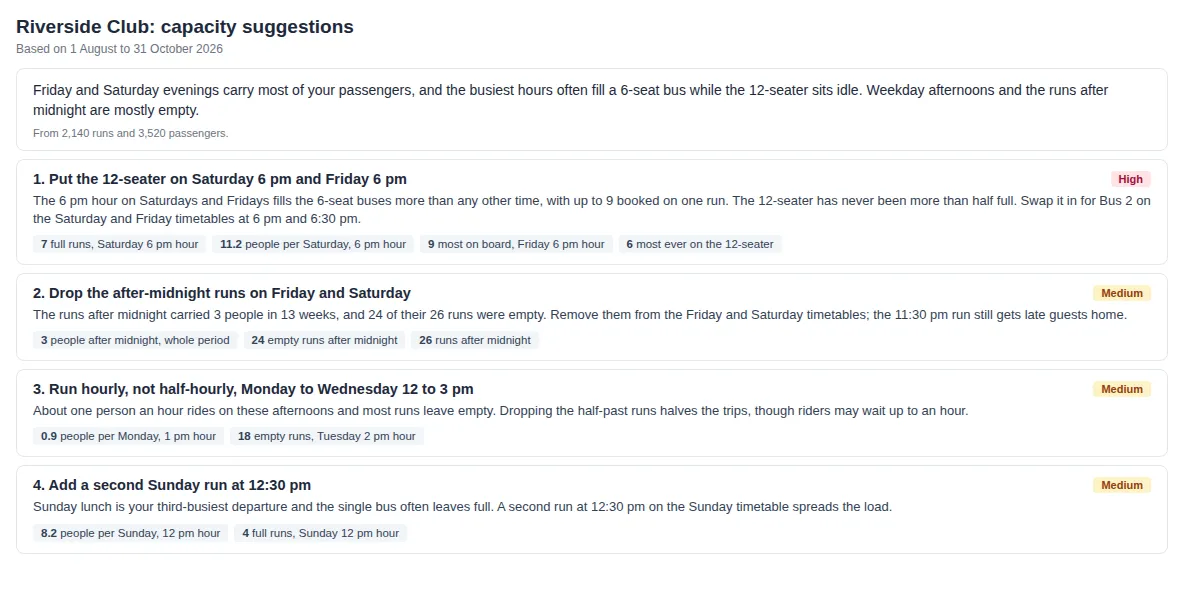
Capacity Suggestions looks at months of your own runs and passengers and tells you, in plain English, where your buses are overflowing, where they run empty, and what to change in your timetables.
Included in CertaBus Premium and the free trial.
What you get
The right bus at the right time
Spots the hours where a small bus keeps filling up while a bigger one sits idle, and suggests the swap.
Changes to your timetables
Names the day, time and timetable to change: add a run, drop or merge runs, or run hourly instead of half-hourly.
Empty runs stand out
Finds the late-night and quiet-afternoon runs that hardly anyone uses, so drivers and buses go where they’re needed.
Backed by your figures
Every suggestion shows the numbers behind it, and each one is checked against your data before you see it.
No personal details
Only counts and averages are used: never names, phone numbers, addresses or membership numbers.
Trade-offs spelt out
Where a change saves a run but means a longer wait for a few riders, the suggestion says so.
How it works
- Go to Admin → Analytics and choose Capacity Suggestions.
- Pick the period to base it on: Last 3 months, Last 6 months or Last 12 weeks.
- Click Make suggestions. It takes a minute or two, and you can leave the page and come back.
- Read each suggestion and the figures behind it, then change your timetables in Timetables if it makes sense for your venue.
Step-by-step details are in the knowledgebase.
Common questions
Where do the suggestions come from?
CertaBus adds up your runs, passengers and seats by bus, day and hour, and Claude, an AI model from Anthropic, reads that summary and writes the suggestions. The figures each suggestion relies on are checked against your data, and any suggestion whose figures don’t match is left out.
What data is used?
Only counts and averages, such as passengers per Friday 6 pm hour or how often a bus was full. Names, phone numbers, addresses and membership numbers are never sent.
How much data do I need?
At least 30 runs that carried passengers in the period you choose. Three months or more gives the best suggestions.
Does it change my runs or timetables?
No. It only makes suggestions. You decide what to change, in Timetables or on the Runs page.
Who can use it?
Owners and admins. You can make new suggestions up to five times a day.
Which plan includes capacity suggestions?
Capacity Suggestions is part of CertaBus Premium, and it’s included in the free 30-day trial.
More features
See CertaBus at your venue
Start a free 30-day trial of CertaBus Premium. No setup fees and no credit card.