Venue impact reportPremium
Show what your courtesy bus is worth
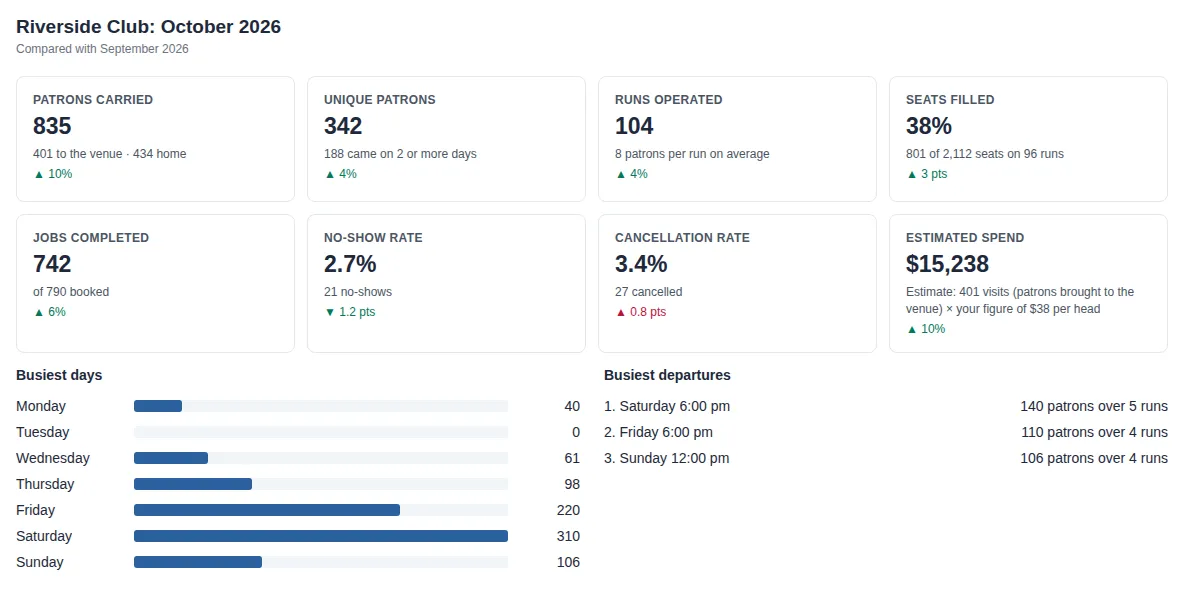
The impact report turns your bookings into the numbers your board and managers care about: how many patrons the bus brought in, how many came back, and when it was busiest. Each month is compared with the one before.
Included in CertaBus Premium and the free trial.
What you get
Patrons carried
Everyone the bus brought to the venue and took home, with unique patrons and how many came back on two or more days.
Busiest nights and departures
Your busiest days, your top three departure times and a day-by-hour grid, so runs match demand.
How hard the buses work
Runs operated, patrons per run and the share of seats filled, from each bus’s capacity.
Compared with last month
Every figure shows whether it went up or down on the period before.
Bookings at a glance
No-show and cancellation rates, how jobs were booked (online or in the office) and patrons by zone.
Ready to share
Print it or save it as a PDF for your board. Turn on the monthly email and owners and admins get last month’s headline figures on the 1st.
How it works
- Go to Admin → Analytics and choose Impact Report.
- Pick Last month, This month, Last 3 months or your own dates. Each figure is compared with the period before.
- Click Print / Save as PDF to share it.
- Optional: in Admin → Settings → Impact report, add your average spend per head for an estimated spend, and turn on the Monthly email.
Step-by-step details are in the knowledgebase.
Common questions
Who can see the impact report?
Owners and admins. Other users keep the other reports in Admin → Analytics.
How is “patrons carried” counted?
Passengers on completed jobs, plus jobs still pending on runs that have already left (drivers don’t always tick every job). The report says how many jobs weren’t marked, so nothing is hidden. Cancelled jobs and no-shows aren’t counted.
Does a run after midnight count towards the next day?
No. Days run from 4 am, so a 1 am run on Saturday counts towards Friday night, the way your staff think about it.
Where does the estimated spend come from?
From a figure you enter: your average spend per head, multiplied by visits (patrons the bus brought to your venue; the trip home isn’t counted again). It’s always labelled as an estimate, and it’s only shown if you enter a figure.
Who gets the monthly email?
Nobody until you turn it on in Admin → Settings. Then your owners and admins get last month’s headline figures early on the 1st, with a link to the full report. Months with no trips aren’t emailed.
Which plan includes the impact report?
The impact report and its monthly email are part of CertaBus Premium, and they’re included in the free 30-day trial.
More features
See CertaBus at your venue
Start a free 30-day trial of CertaBus Premium. No setup fees and no credit card.